|
MAOS
Multithreaded Adaptive Optics Simulator
|
|
MAOS
Multithreaded Adaptive Optics Simulator
|
Macros | |
| #define | VAR_GET(STRUCT, FIELD) |
| #define | VAR_GET_2(STRUCT, FIELD, NUM) |
| #define | MAP_ALL(NAME) |
Functions | |
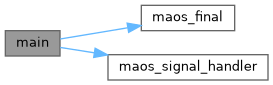
| void | maos_final (int sig) |
| int | maos_signal_handler (int sig) |
| int | main (int argc, const char *argv[]) |
Defines main() and a few utilities. *
| #define VAR_GET | ( | STRUCT, | |
| FIELD ) |
| #define VAR_GET_2 | ( | STRUCT, | |
| FIELD, | |||
| NUM ) |
| #define MAP_ALL | ( | NAME | ) |
| void maos_final | ( | int | sig | ) |
Rename the log files when simulation exits or when signal is caught.
| [in] | sig | Signal number caught, or 0 for normal exit. |
| int maos_signal_handler | ( | int | sig | ) |
Handles signals.
| [in] | sig | Signal number caught. |
| int main | ( | int | argc, |
| const char * | argv[] ) |
This is the standard entrance routine to the program. It first calls setup_parms() to setup the simulation parameters and check for possible errors. It then waits for starting signal from the scheduler if in batch mode. Finally it hands the control to maos() to start the actual simulation.
Call maos with overriding *.conf files or embed the overriding parameters in the command line to override the default parameters, e.g.
maos base.conf save.setup=1 'powfs.phystep=[0 100 100]'
Parameters given as key=value in the command line override those in .conf files given in the command line, which override the master .conf, regardless of the order. Within each of them, a later value overrides an earlier one. The configure file default.conf will be loaded as the master .conf unless a -c switch is used with another .conf file. For scao simulations, call maos with -c switch and the right base .conf file.
maos -c scao_ngs.conf override.conf
for scao NGS simulations
maos -c scao_lgs.conf override.conf
for scao LGS simulations. With -c switch, default.conf will not be read, instead scao_ngs.conf or scao_lgs.conf are read as the master config file. Do not specify any parameter that are not understood by the code, otherwise maos will complain and exit to prevent accidental mistakes.
Generally you link the maos executable into a folder that is in your PATH evironment or into the folder where you run simulations.
Other optional parameters:
-d          do detach from console and not exit when logged out
-n 4        launch 4 threads.
-f          To disable job scheduler and force proceed
sim.seeds=[2 4]  set seeds to [2 4]
In detached mode, drawing is automatically disabled.
| [in] | argc | Number of command line arguments. |
| [in] | argv | Command line arguments. |
 1.15.0